What to do before you come to class
Entry Criteria
Learning Objectives
Welcome
To take this course you must have completed Intro to Digital and received a micro-credential badge by email. Check your email. This badge is your ticket to access this course.
You will receive an email within two weeks of completing ITD, inviting you to begin this course as a Learner. All operational details should be linked in this email. If you have not received an email, please tell us at contact@codeyourfuture.io.
Log in to your Course Portal. This the same portal you used to complete ITD. A new set of steps should have appeared. These are the steps to complete ITP.
If you are all signed up and logged in, please now continue…
Notes
Writing information down helps you learn.
Writing helps you process what you’re reading more than just reading it. Keeping notes also gives you a reference you can check. It can also help you plan, and remember to come back to things.
The curriculum will often tell you to write something in your notebook. You can do this however you want - on paper in a physical notebook, in a Google Doc, in a specialised application like Obsidian, or however works for you.
We recommend you keep notes as you go through the course and learn.
Goals
Learning Objectives
You have joined us as a trainee. Your overall goal for this module is to understand how to succeed at the ITP course.
To demonstrate you know how to succeed at the course, you should apply to enrol as a Trainee within the next three weeks. To do this, you will need to do show up every week, learn, get work done, and get your work reviewed.
You should enrol as a Trainee within the next three weeks. If you do not enrol as a trainee by week 6 of this course, you will be removed from it. You can request to restart in the next ITP course.
🎯 Complete onboarding and enrol as a Trainee
Find the learning objectives for the text you are reading now. These are the goals for this text. This is what you should be able to do after completing this text.
Now find the learning objectives for Sprint 1 of the Onboarding module. We call these the “success criteria”. These are the goals for the first sprint of the module. This is what you should be able to do after completing Sprint 1.
This formal structure might be new to you. It is a way to help you evaluate for yourself whether you have achieved the goals of the module. If you have done (and can do) the things listed in the learning objectives, you have gained the skill. If you have not, you have not yet gained the skill, and should keep working at it.
As we are just meeting this idea, let’s go over them here too. The skills you’ll learn in this module are based around these themes: version control, requirements and testing, code review, data, and scientific method. Write each of these themes down in your notebook.
To complete the module, you will need to demonstrate you have learnt these skills, and apply to enrol as a Trainee.
Version control
By the end of this module you will have tracked changes to data (your code) over time with Git and GitHub. Your goal is to build a mental model of Git “trees” and begin learning ways to travel through files using the “time machine” of Git.
Requirements and Testing
By the end of this module you will have written code to solve specific problems and verified that it does what it is supposed to. Your goal is to interpret requirements and write code to meet acceptance criteria.
Code review
By the end of this module you will have revised, refactored, and reviewed code using code review. Your goal is to form the habits of a professional who can think, talk, and write in a technical context.
Scientific method
By the end of this module you will have written and asked well-structured developer questions. Your goal is to build a strategy to methodically solve problems.
Enrolment
By the end of this module you will have enrolled as a Trainee. Your goal is to complete the onboarding process and enrol as a Trainee.
Expectations
Learning Objectives
Learners, we expect you to:
- Work in groups and individually, in class and during the week.
- Show up on time and participate in all activities, including helping others.
- Complete the work in the way it is specified.
- Do your best.
Learners, you can expect:
- Fair, achievable requirements, explained as clearly as possible.
- Help from volunteers and other learners with your questions and blockers.
- A safe, inclusive environment where you can learn and grow.
- Many opportunities to succeed.
We expect everyone to:
- Follow the Code of Conduct.
- Help each other.
- Do the prep.
💬 Right! Participating to the best of your ability is necessary. You will get more out of attending in person if possible, but if not there’s online class too.
💬 No, this isn’t a coding club, it’s a vocational training programme and classes are part of it.
Acceptable AI Use
Learning Objectives
This is the most critical stage for your development. You are building the fundamental understanding of programming logic, problem-solving, and computational thinking that everything else depends on.
Using AI to generate code at this stage undermines this foundation.
AI IS appropriate for:
- Asking “what does this concept mean?” questions (e.g. “explain what a loop does”)
- Getting alternative explanations when documentation is unclear
- Asking AI to explain why a piece of code you have already written works the way it does
- Exploring “what happens if I change this?” questions.
- Understanding error messages you have encountered yourself
AI is NOT appropriate for:
- Generating solutions to assignments
- Debugging code you have not tried to debug yourself first
- Writing any code you could not reproduce and explain yourself
- Answering written reflection questions or self-assessments
The test: If you deleted your solution and had to recreate it on your own from scratch, without AI, could you?
If not, you have not learned it yet, regardless of whether the code works. Good learning means your skills grow each time you use AI, not become more dependent on it.
Prompting for understanding, not answers
When you do use AI at this stage, frame your questions to push your own thinking:
Not appropriate: “Write me a function that finds the largest number in an array”
Appropriate: “I wrote this function [paste your code]. Can you explain what each line does and tell me if there is anything I might be missing?”
Appropriate: “My code gives this error [paste error]. Can you explain what this type of error means so I can work out how to fix it?”
Building understanding that lasts:
Remember: You shouldn’t have to ask AI the same thing twice. If you find yourself asking similar questions repeatedly, that’s a sign you’re using AI to do the work rather than to learn.
❌ Today: ‘Write a function to find the largest number in an array’
Tomorrow: ‘Write a function to find the smallest number in an array’ (You’ve learned nothing - you’ll need AI every time)
Whereas in the following scenario, actual learning is demonstrated.
✅ Today: ‘I’m trying to find the largest number in an array. Can you explain the approach without writing code?’
Tomorrow: You write the function yourself to find the smallest number because you understood the approach.
💬 No, this uses AI to do the logic for us - so we don’t learn how to problem solve.
💬 No! This is unacceptable because where AI is used to generate an answer for us, instead of helping support our understanding.
💬 Yes, that is a good question explore the code deeper to help your understanding grow!
To read the full AI guidelines for trainees please see here: AI Use Guidelines for Trainees
Help
Learning Objectives
Everyone at CYF has barriers to education. We can help with some things, and can recommend where to get help with others. Our signpost website has more details.
The support we can offer is around your ability to come to class, or follow the course material. We can support you financially with the following things for the first 5 weeks of ITP. In this time, we expect you to enroll as a trainee - after 5 weeks, we can only continue supporting enrolled trainees.
If you cannot come to an in-person class because you can’t afford:
🧒 Childcare
We can help you with childcare costs for the class and to study during the week. See our childcare expense policy for more details.
🚌 Bus or train tickets
We expect you to come to class every Saturday. We can help with travel costs if you need it. See our travel expense policy for details.
💻 Broadband
We can help you with data access if you need support with it. See our internet access expense policy for more details.
🥪 Food
It will always be provided in class.
💻 A computer
If you do not have access to a computer, or if you are worried your computer won’t be able to run everything needed during the course, we can lend you a laptop. Let us know as soon as possible if you need to borrow one.
We ask that you complete the onboarding module step before we enrol you as a Trainee. We are obliged to only enrol people we have a reasonable expectation of being able to complete the whole course. But predicting the future is a challenge! We have created this module to try to give as many people as possible a fair chance to show they can do this.
💬 No, we work in teams.
💬 No, your team can help you too.
💬 Yes, a quality professional builds understanding by asking and answering good questions.
💡Remember
We all help each other at CYF. We are a community.
You are not competing against each other for a limited number of places. We will accept everyone who meets the success criteria.
- You should ask for help
- You should help others
Prep
Double-check you have everything you need to start this course.
- You have completed ITD and received an invitation to join this course by email
- You have signed the Code of Conduct
- You have signed the Learner agreement sent to you by email
- You know how to get to class in person
- You have read and understood the success criteria
If you need help with any of these, ask in Slack or go to the Signposts website.
Now go read over the day plans, backlogs, success criteria and complete the quiz. You can do it! 🚀
💬 No, it’s a mistake to be late for class.
💬 Yes, you should be ready to begin at 10am.
💬 No, you must come to class on time.
💬 Yes, sign the register as soon as you come in.
💬 No, you should sign the register first.
💬 No, you should sign the register first.
Professional Accounts
Learning Objectives
Download and install the following software or register for the apps if you have not done so already.
Click on the links to go to the registration pages. Keep your login details for all sites/apps consistent and always use your real name.
📢Important
Real name
We recognise you may need to keep your birth name private. When we say real name, we mean the name you go by. It does not have to match your birth certificate or any other legal document. It has to be consistent and professional.
Every time you create an account which can have a profile picture, you should set one up. Follow these professional image guidelines when picking an image. Use the same picture for every account.
💡Robohash
Gmail, Google Account
Make a new Google account if you do not have a professional one already. What is a professional email address?
- Use your real name.
- Don’t use any numbers or words that are not your name.
- Never put the year of your birth or age in your professional email address.
Your email address should look something like this:
This is your public professional email address. Use it to sign up for all your professional accounts unless you can use your GitHub.
- I have made a professional Google account and Gmail address.
- I have explored the Google Suite, such as calendar, docs and spreadsheets.
GitHub
You will use GitHub to store your code and to collaborate with your peers. You have already made a GitHub account, but you need to check it is professional. You can change your username in your settings. You can add your professional email address in your settings too. (You can have more than one email address on your account.)
- My GitHub account shows my professional name
- I have added my professional email address to my GitHub account.
Sign up for LinkedIn. LinkedIn is the largest professional social network. You will use it to help you get a job and to advance your career.
Make a LinkedIn account. Use your real name. Sign in with Google. Connect with your cohort.
Your cohort is your first network, and this is one of the most valuable things you can develop at CYF. A strong, tightly linked, professional network is a powerful asset, so begin building it today.
- I have made a LinkedIn account using my professional email address.
- I have used my real name.
- I have connected with my cohort.
- I am following CYF.
Slack
Slack is our community space and how we communicate with each other. Download and install it now. If you are not using your own computer, log in to the web version instead.
- I have downloaded the Slack app on my computer and phone.
- I have logged in to the CYF ITP workspace.
- I have found and joined my class channels.
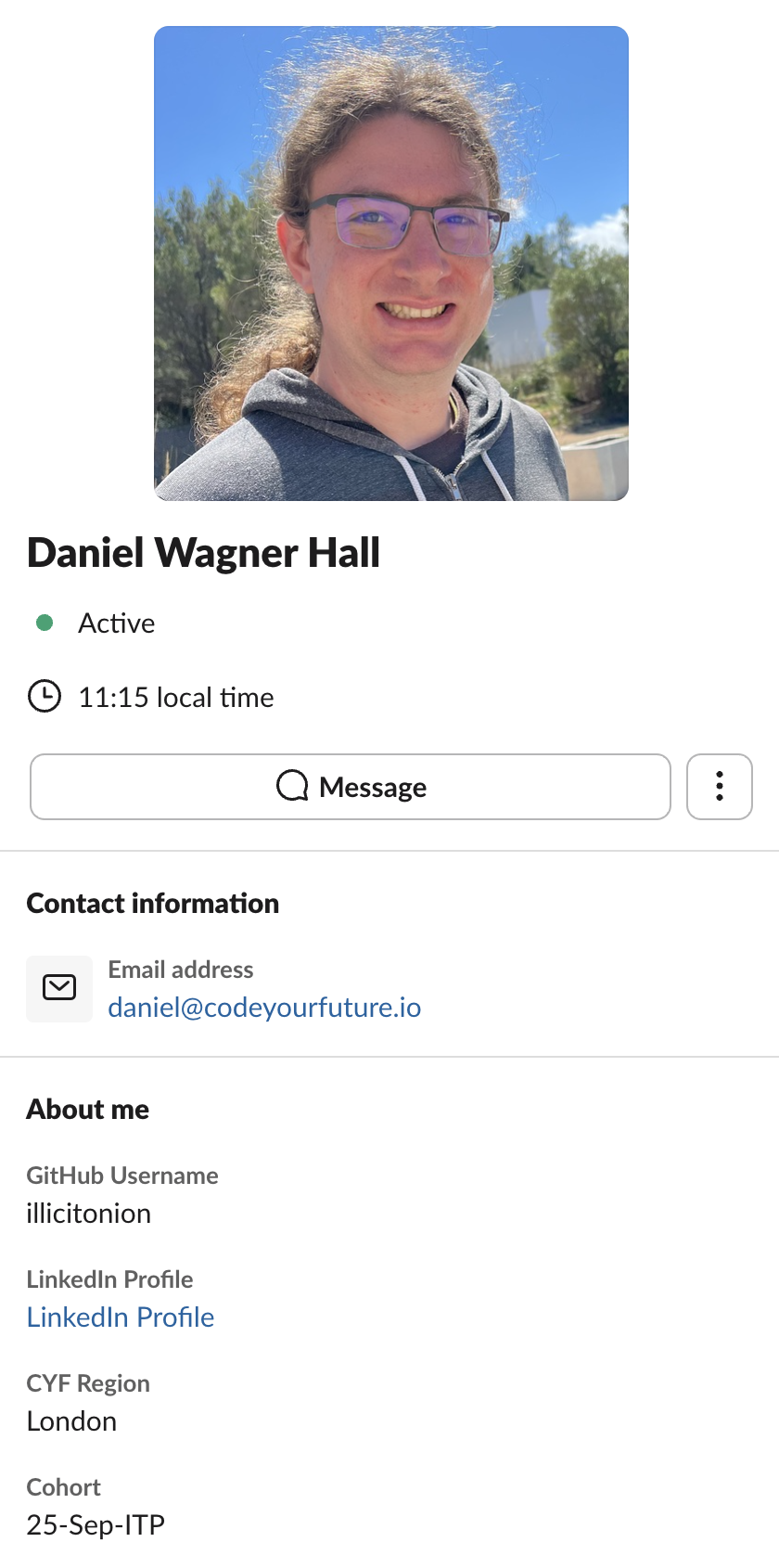
- I have updated my profile with my picture, my professional email address, my GitHub username, my Linkedin profile, my region, and my cohort.
- I have introduced myself on Slack.
See this example fully filled-in Slack profile - make sure yours has at least the same fields filled on:
Applications
Google Chrome
- I have downloaded and installed Google Chrome.
- I have logged into my professional profile on Chrome.
Use your professional Chrome profile for all your CYF work. You will often have to share your screen during sessions, so keep your personal internet use private and away from your professional profile.
VSCode
We will use Visual Studio Code (VSCode), a customisable text editor you will use on this course and at work. If you are new to using tools like VSCode there are video resources which can help you familiarise yourself with the interface.
- I have downloaded and installed Visual Studio Code.
Zoom
Usually we use Meet, but sometimes we use Zoom for remote sessions. If you are using a library computer you can use the web version, if you are using your own computer you should install it now.
- I have downloaded and installed Zoom onto my computer.
House Rules
Learning Objectives
Come on time when you’re learning
Many people give up their free time to teach us. They could be doing other things. We should respect this and always be on time.
Clean up after ourselves
Kind people let us use their space. We should keep it tidy and clean, just like our own homes.
Talk to each other (in English)
Put Slack on your phone and computer. Use it to ask for help and talk about classes. Speaking English helps everyone get better at it. Even if you know someone’s language, try to use English.
Learn to find answers yourself
We teach you how to look things up. Try to use Google to answer your own questions.
Use the computer yourself
Don’t let volunteers or peers type for you. Ask for help, but do the work yourself.
Help each other out
You’re all learning together. You can understand each other’s problems. Ask for help and offer it too. Explaining things to others helps you learn more.
We’re all part of this
This isn’t just a coding school. It’s for all of us - participants, trainees, volunteers. Try to make it better in any way you can.
Create a work folder
Learning Objectives
📢Important
Make a folder called CYF in your home directory. Store all your work for the course in this folder.
You’ll need to create a CYF folder to store your projects on the course. You can do this any way you like (e.g. through a file explorer, or using the terminal.)
If you want to create the folder using the terminal, expand these instructions.
- Open a terminal on your computer.
For each of the steps below, you’ll need to use the command line in your terminal.
Use this cli documentation to remember terminal commands.
In your terminal, print your current working directory (by running
pwd). Make sure you’re in your home directory. If you’re not, you may need to change directory with the commandcdto your home directory.Make a new directory called
CYFin your home directory (by runningmkdir CYF).Check that the directory got created by listing the children of the directory (by running
ls) - you should seeCYFthere.Change directory into the
CYFdirectory by runningcd CYF.Double check you’re in the right place by printing your current working directory (by running
pwd) again.
💡Tip
If you’re working on a library computer, skip this step. You will store your work in your GitHub account.
Check Git Installation
Learning Objectives
Git
📖Definition: Git
You will use Git continually as a developer. Before we can do any work with it we need to check that you have it installed.
Open your computer’s terminal application and run the command git --version to double check you have Git installed.
If it is installed successfully, you should get a version number (which may not be exactly the same as this example, but should look similar):
git version 2.40.0Otherwise, you will need to install it or ask for support on your Slack channel.
CYF Blog
Imagine that two people are writing a blog. Ahmed and Naima are writing a blog together about their struggles learning coding.
The published blog is live here 👉 Educational blog
✍️Exercise - Investigate the Resources
Development process
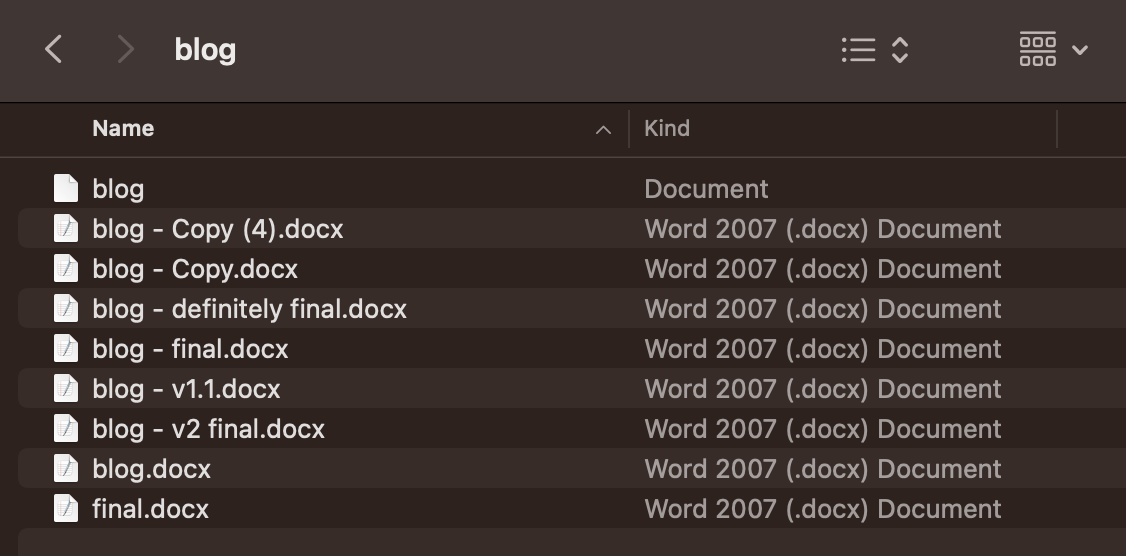
Ahmed and Naima are using the following development process for writing their blog:
- Writing the blog in a single file on a single computer
- Saving multiple versions of the file on the same computer
- Taking turns to use the computer during the day
At the moment, the computer has a folder with the blog that looks like this:
✍️Exercise - Challenges
Describe some of the challenges that Ahmed and Naima face when trying to write a blog together in this way.
Look in Slack. Has someone made a post describing Ahmed and Naima’s challenge? Share your answers as a reply to this post, making a conversation 🧵 thread.
Version control software
Learning Objectives
To improve their way of working, Ahmed and Naima realise they need the following:
- A way to both know what the most recent version is
- A way to know what the old versions were, and in what order (i.e. how they got to the current version, and what content they may have deleted that they may want to get back)
To manage the different versions of the blog project, they decide to use Git.
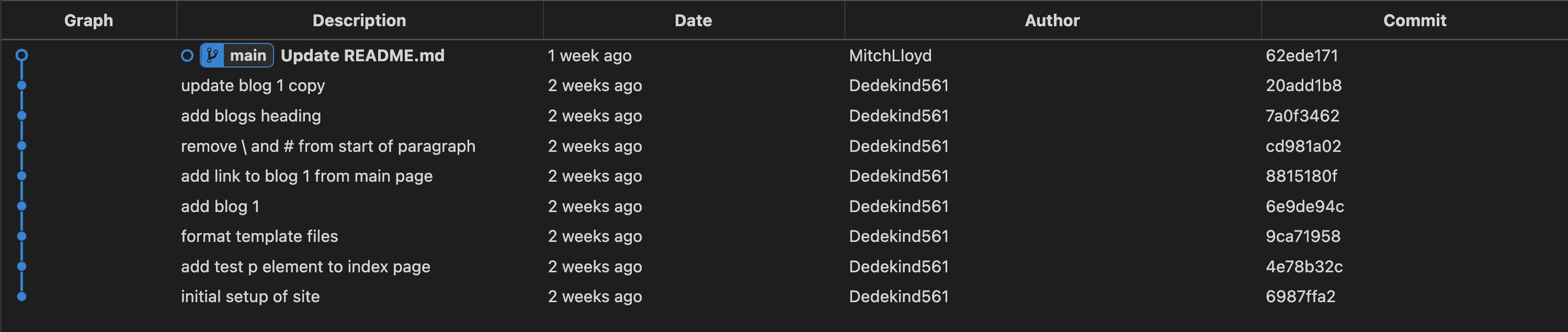
In Git, we create different versions of a project over time by creating commits.
A commit is a snapshot of our project at a particular point in time. You can also think of a commit as a particular version of a project.
Commits store the following information:
- what changed in this commit
- who created the change
- what time the change happened
- what the previous commit was
A typical timeline of commits might look like this:
📝Commit hashes
Commits also have a hash associated with them. A hash is a long string of characters used to identify a particular commit.
A typical hash will look like this: fec6909d6de23c75e77960986a9b6a7aee7feec7 but you will often see them abbreviated to the first few characters like this: fec6909
Sharing history
Learning Objectives
Earlier on, Ahmed and Naima realised they also need a way to share the history of the project between different users and different computers.
To share a project and its history, we can use an online platform called GitHub
GitHub is a platform where teams can store projects along with a history of their different versions.
By storing projects on GitHub, multiple users can gain access to the history of a project.
📖Definition: Repository
✍️Exercise - Exploring a Repository
In this exercise, you’ll need to explore a GitHub repository.
You’ll need to look around and figure out where to find different files and find out information about them.
You won’t be expected to know what the files do at this stage.
Go to the following link: https://github.com/CodeYourFuture/education-blog
It will take you to a GitHub repository called education-blog.
Answer the following questions using the page linked to above:
- View the README.md file. What do the instructions tell you?
- How many files are there inside the
blogsfolder? - How many lines are there in the package.json file?
- Find the file with the blog content you can see on the live site here blog 1
You’ll learn more about these type of files throughout the course.
We can use the Github interface to explore the different commits (versions) of a project too.
✍️Exercise - Exploring a Commit
Go to the following link: https://github.com/CodeYourFuture/education-blog/commits/main
Go to the commit that says “add test p element to index page” and try answering the following questions:
- How many files were changed in this commit?
- Who created the change?
- What time did the change take place?
✍️Exercise - Finding a Commit
Go to the following link: https://github.com/CodeYourFuture/education-blog/commits/main and locate commit that says “remove \ and # from start of paragraph”
- How many files were changed in this commit?
- What change was made in this commit?
Configuring Git with VSCode
Learning Objectives
Git is a version control system that helps developers track changes to their code. Before you can use Git effectively, you need to configure it on your machine and connect it with VSCode, your code editor.
What is Git?
Git allows you to:
- Track every change you make to your files
- Work collaboratively with other developers
- Save different versions of your project
- Revert to previous versions if something goes wrong
Step 1: Install Git
On Mac
- Go to https://git-scm.com/download/mac
- Download and install the package
- Open Terminal and type:
git --versionto verify installation
On Linux
Open your terminal and run:
sudo apt-get install gitThen verify: git --version
💡What's a Terminal?
A terminal (also called command line or console) is a text-based interface where you type commands to control your computer. Think of it as giving your computer instructions in its native language.
We will learn a lot more about the terminal in future sprints.
Step 2: Configure Git with Your Name and Email
Git needs to know who you are. Open your terminal and type these commands (replace the values with your own):
git config --global user.name "Your Full Name"
git config --global user.email "your.email@example.com"
Why is this important? Every commit (version save) will be labeled with your name and email, so others can see who made changes.
Step 3: Set VSCode as Your Default Git Editor
When you make a commit, Git might open a text editor to let you write a detailed message. Let’s tell Git to use VSCode:
git config --global core.editor "code --wait"This tells Git: “When I need an editor, use VSCode and wait for me to save and close it before continuing.”
Step 4: Verify Your Configuration
Run this command to see all your Git settings:
git config --listYou should see:
user.name=Your Full Nameuser.email=your.email@example.comcore.editor=code --wait
💡Troubleshooting
If the configuration doesn’t appear, or if you see errors, don’t worry. The most important settings are user.name and user.email. You can always reconfigure later.
Can’t open terminal?
- Mac: Press
Cmd + Space, type “Terminal” - Linux: Right-click desktop and select “Open Terminal Here”
If the output doesn’t make sense or you can’t find what you’re looking for you can post a screenshot in Slack and ask for advice. You can also ask a volunteer in class.
What’s Next?
Now that Git knows who you are, you’re ready to:
- Create a local repository
- Make commits (save versions of your work)
- Push your code to GitHub
You’ll learn these skills in the next sections!
Further Reading
Creating a Commit
Learning Objectives
A commit is a saved version of your project at a particular moment in time. Think of it like saving a document, but with a detailed message explaining what changed and why.
Understanding the Three States
Git has three states for your files:
- Modified - You changed the file, but haven’t saved the version yet
- Staged - You’ve marked the file as ready to be saved
- Committed - The file is now saved in Git history
Step 1: Create a New Repository
A repository is a folder where Git tracks all your files and their changes.
Create a new folder for your project called
my-first-repository. Open it in VSCode.We’re going to initialise a Git repository in this folder. Open the
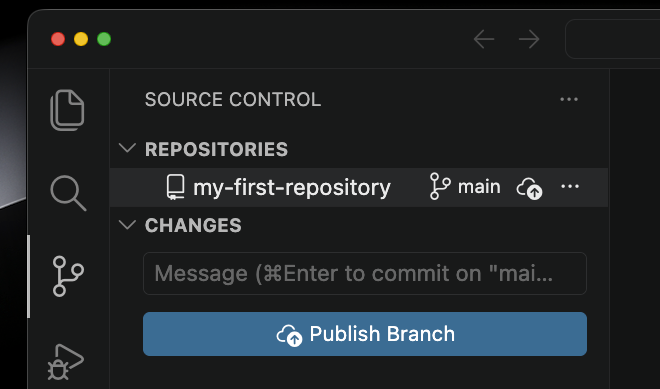
Source Controltab on the left of the VSCode window (highlighted red in the screenshot below) then click theInitialize Repositorybutton.
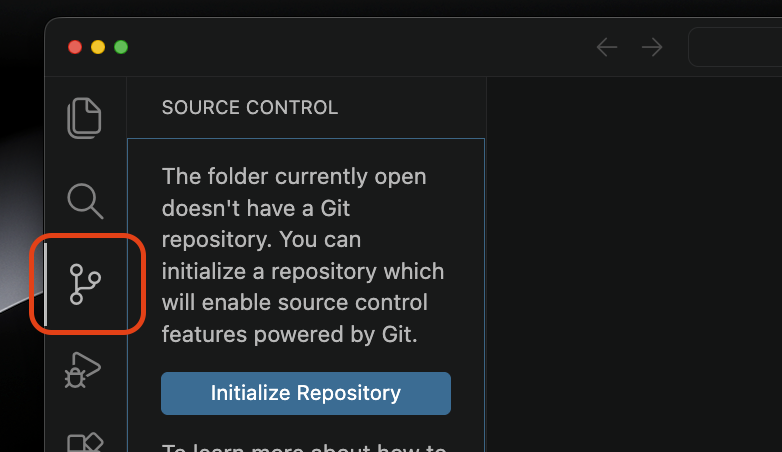
The tab should now look like this:
Step 2: Create a File and Make Changes
Let’s create a simple text file:
- Create a new file called
notes.txtin yourmy-first-repositoryfolder. - Add some text:
My First Git Project Today I'm learning Git! This is my first commit. - Save the file
Step 3: Check the Status of Your Repository
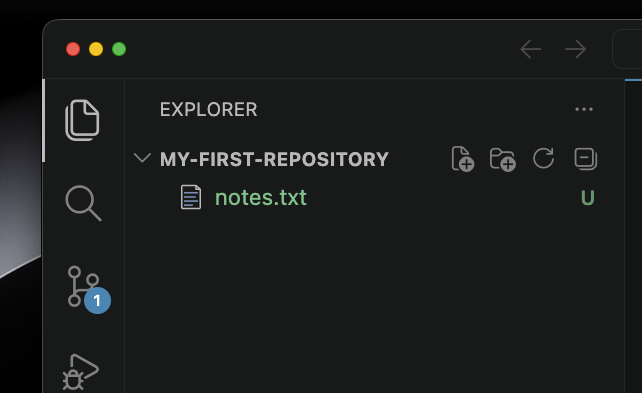
Let’s see what’s changed in VSCode after adding our file. The first thing you will notice is that our file name is now green with the letter U next to it:
We also now have an icon on the source control tab. If we click there we can see our file is listed here too:
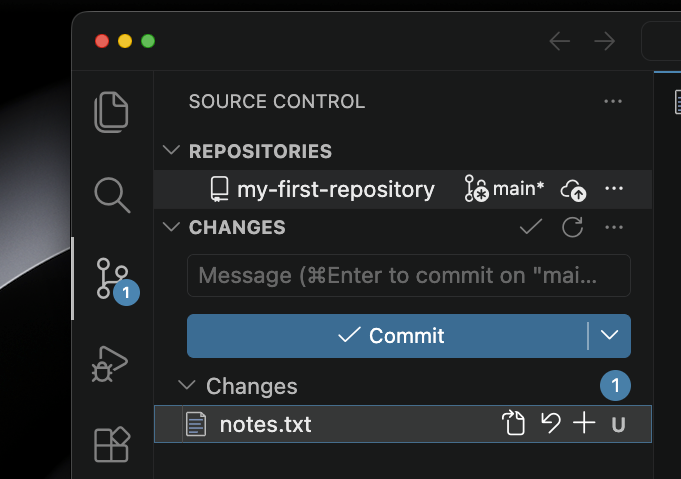
The green U means our file is untracked.
Git is saying: “I see a file called notes.txt, but you haven’t told me to track it yet.”
Step 4: Stage Your Changes
Now we tell Git we want to save this version of the file. This is called staging. When you hover your mouse over the file name a plus symbol will appear:
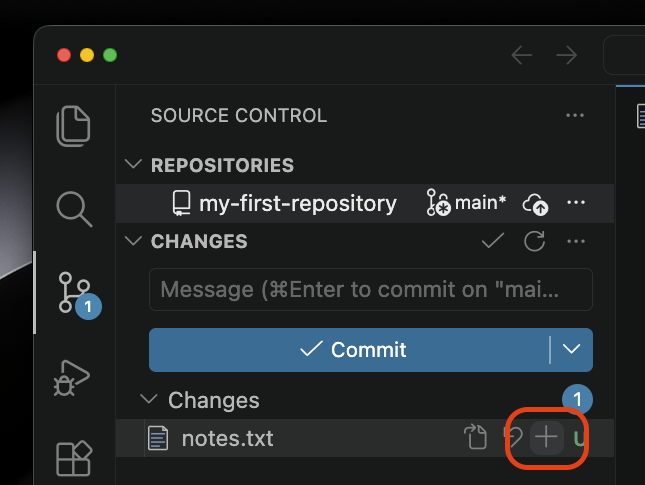
Click the button and the file will move to a new section called Staged Changes:
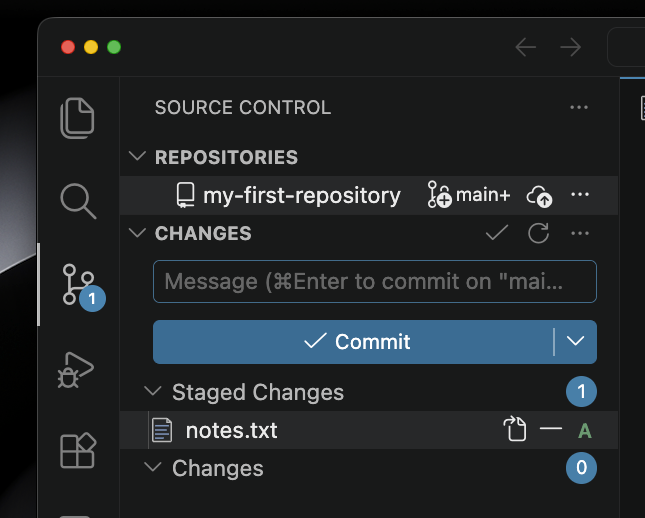
The letter has changed to an A for added too. Git is saying: “I’m ready to save this file.”
Step 5: Create Your First Commit
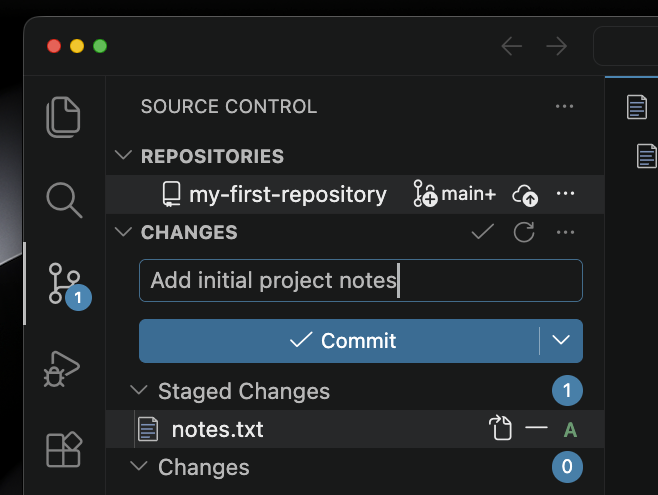
It’s time to make our first commit and save this version of our file into our Git history. In the text box in the source control tab we can enter a commit message. The message describes what we changed. Add the text “Add initial project notes” then click the “Commit” button to make our first commit!
💡Good Commit Messages
Write messages that explain what you changed and why:
- ✅ Good: “Add login button to homepage”
- ✅ Good: “Fix bug where users can’t save files”
- ❌ Avoid: “stuff”, “changes”, “update”
Keep messages short but clear (under 50 characters is ideal).
Step 6: View Your Commit History
VSCode has a tool which lets us see the messages attached to every commit in our repository. Scroll down to the “graph” section of the page to see it.
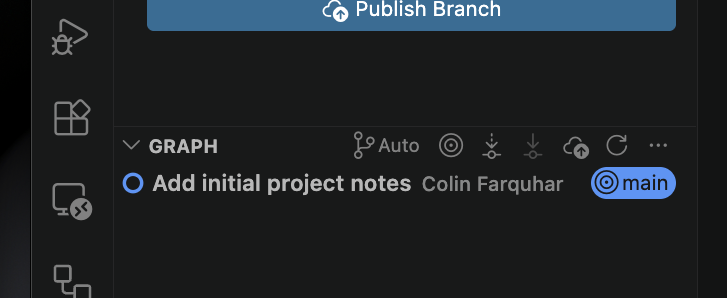
You should see your commit with:
- Your name
- Your commit message
- The word
mainnext to it. This is the branch of our repository we are working on and we’ll explain more about this in the next sprint.
You can click on a commit message to display a list of the files it changed underneath.
Workflow Summary
Here’s the complete workflow for making commits:
- Modify files in your editor
- Stage changes in the source control tab
- Create commit with a meaningful message
✍️Exercise: Make Another Commit
- Create a new file called
planning.txt - Add some text to it
- Save it
- Stage your changes
- Make a commit with the message
"Add project planning document" - Check the history to see both commits
Remote Repositories
Learning Objectives
So far, our commits are saved on our computer. A remote repository is a copy of our project stored on a server (like GitHub), so others can access it and we have a backup.
Why Use Remote Repositories?
- Backup - Your code is safe on GitHub’s servers
- Collaboration - Other developers can access your code
- Portfolio - Employers can see your work on your GitHub profile
- Team projects - Work together on the same codebase
Local vs Remote
Step 1: Create a Repository on GitHub
- Go to https://github.com
- Click the + icon in the top right
- Select “New repository”
- Give it a name (e.g.,
my-first-project) - Add a description (optional)
- Choose “Public” (so your portfolio is visible)
- Don’t initialize with README, .gitignore, or license
- Click “Create repository”
Why not initialize with README?
Step 2: Add the Remote Connection
GitHub will show you a page with instructions. You need to tell your local Git about this remote repository.
First copy the url to your clipboard.

Then go back to VSCode’s version control tab, expand the menu next to the repo name and go down to “remotes”. Select “Add remote”.
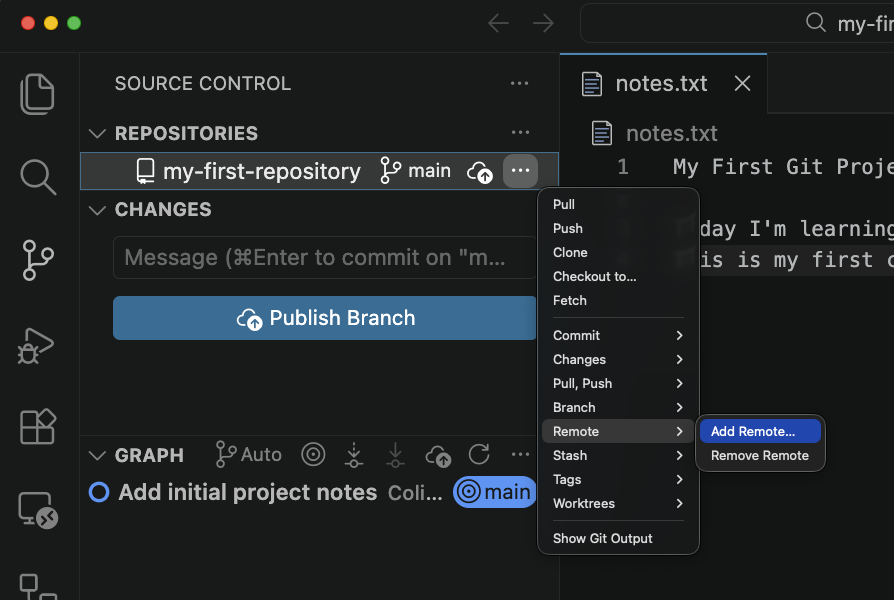
In the dialogue box which appears paste the url you copied from GitHub.

Finally give the remote a name. For now we will give it the name origin. We could name it anything we like, but we will follow convention.

We have now linked our local repository with our GitHub repository!
Understanding “origin” and “main”
There are two terms we have seen now which are probably unfamiliar. Both are important and we’ll learn more about why in the coming weeks.
origin- The name used to refer to your remote repository (GitHub).main- The name of your default branch.
📖Definition: Branches
📖Definition: Remotes
origin remote but we may also want to create others if we want to share our code somewhere else. For example, if we wanted to host a website on AWS we would need to create a remote there too.What’s Next?
Now that your repositories are connected, you’re ready to:
- Push - Send your local commits to GitHub
- Pull - Get updates from GitHub
- Collaborate - Work with other developers
Pushing and Pulling
Learning Objectives
Now that your local and remote repositories are connected, you need to learn how to synchronize them. Pushing sends your local commits to GitHub, and pulling gets updates from GitHub.
The Git Workflow
Step 1: Push Your Commits to GitHub
You have commits on your local machine, but they’re not on GitHub yet. Send them using the “Publish Branch” button.
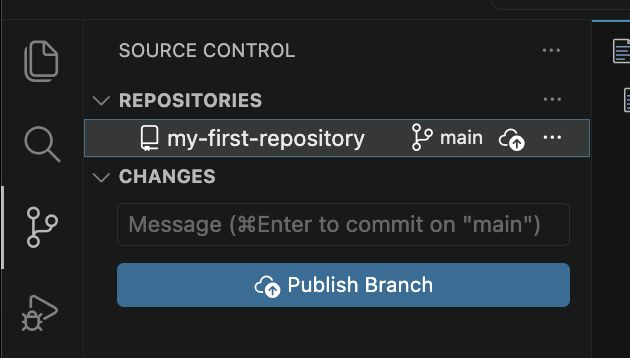
This is called pushing. We don’t need to push every time we commit, but our colleagues won’t be able to access it if we don’t.
You might be asked to authenticate. Follow GitHub’s instructions. Depending on how you linked the repositories you may be able to authenticate using SSH instead of entering a username and password.
💡SSH
Step 2: View Your Code on GitHub
- Go to your repository on GitHub (https://github.com/YOUR-USERNAME/my-first-project)
- You should see your files!
- Click on a file to view its contents
- Click the “History” button (clock icon) to see commits
Congratulations! Your code is now on GitHub and you have a portfolio piece! 🎉
Step 3: Make Changes and Push Again
The workflow for subsequent changes is simpler:
- Modify a file (e.g., add more text to
notes.txt) - Stage and commit the change
- Push to GitHub
That’s it! Your changes are now on GitHub.
✍️Exercise: Practice the Workflow
- Create a file called
facts.txtin VSCode - Add your favourite fun fact to the file
- Save the file
- Commit your changes
- Add another fact. Commit this change.
- Push to GitHub
- Go to GitHub and refresh to see your changes!
Understanding Push and Pull
Remember our diagram from the last section
When you push a copy of your commits is sent to GitHub. Your colleagues can now access them. Even though you don’t need to push after every commit it is still important to do it regularly.
When you pull you get any commits that were sent to GitHub by your teammates. We will look at pulling in more detail in a later section.
The Complete Git Journey
You now know:
- ✅ How to configure Git
- ✅ How to make commits (save versions)
- ✅ How to connect to GitHub (remote)
- ✅ How to push commits to GitHub
You’re ready to:
- Build projects and track changes
- Share code with others
- Build a portfolio on GitHub
What to Practice
- Create 3-5 small projects locally
- Push each one to GitHub
- Make changes and push again